
Retailers today are under constant pressure to do more with less: move inventory faster, keep shelves stocked, deliver a smoother checkout experience, and still protect margins. That pressure is exactly why retail automation has moved from a nice-to-have to a core part of how competitive retailers operate.
At its simplest, retail automation means using software, artificial intelligence, robotics, and connected systems to handle tasks that used to require manual effort, including everything from restocking shelves to personalizing a customer's shopping experience. In this guide, we'll break down what retail automation actually looks like in practice, the technologies behind it, the biggest benefits and challenges, and how to start implementing it in your own operation.
What Is Retail Automation?
Retail automation is the use of technology like software, hardware, AI, and robotics to handle repetitive and time-consuming retail tasks. It touches nearly every part of the business: inventory control, pricing, marketing, staffing, checkout, and supply chain logistics.
The goal isn't to remove people from retail. It's to free employees from repetitive, low-value work like manual stock counts, data entry, and basic customer inquiries so that they can spend more time on things that actually require human judgment, like merchandising decisions, customer relationships, and strategy.
When done well, automation in retail creates a feedback loop: systems collect data in real time, that data gets analyzed, and the resulting insights drive faster, more accurate decisions across the store, the warehouse, and every digital channel a retailer operates in. The result is less guesswork and more consistency, whether you're running a single storefront or an omnichannel fulfillment strategy.
Types of Retail Automation
If you're evaluating where to start, these are some of the most common tools retailers use today:
- Point-of-sale and checkout automation: POS, self-checkout, mobile POS, contactless payments, scan-and-go
- Inventory and replenishment automation: inventory management, RFID/barcodes, stock monitoring, forecasting, automated replenishment
- Order management and e-commerce automation: OMS, order routing, distributed inventory, BOPIS, ship-from-store, returns, e-commerce workflows
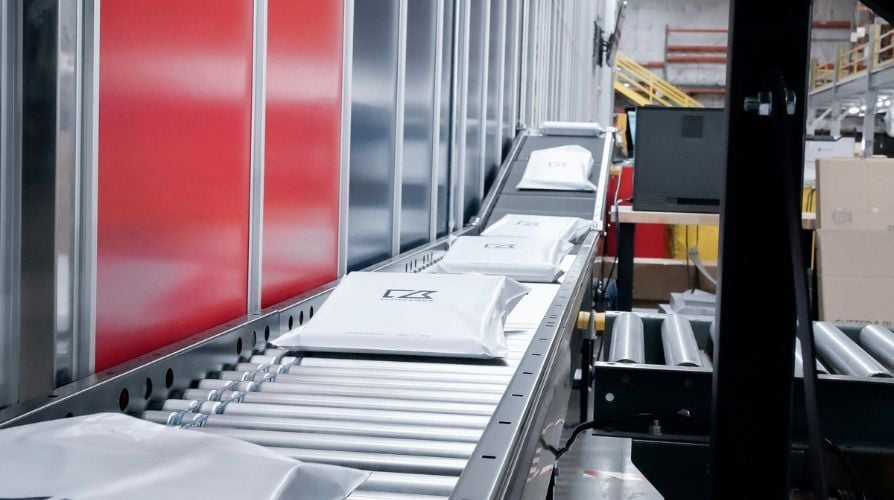
- Warehouse and fulfillment automation: WMS/WES, ASRS, goods-to-person, AMRs, conveyors, robotic picking, packing
- Supply chain and procurement automation: purchasing, supplier management, transportation, shipment tracking
- Pricing and merchandising automation: dynamic pricing, electronic shelf labels, assortment and promotion management
- Customer experience and marketing automation: AI shopping assistants, chatbots, recommendations, CRM, loyalty, personalized marketing
- Workforce, back-office and analytics automation: scheduling, invoicing, reporting, RPA, BI and predictive analytics
The right mix of tools depends heavily on your business size, existing infrastructure, and where you're feeling the most operational friction.
Retail Automation in Practice: Key Use Cases
Understanding the categories is useful, but it's easier to see the value of retail automation through specific, real-world applications.
Inventory Management
Inventory has traditionally been one of the most error-prone parts of retail. Manual counts, static spreadsheets, and guesswork around reorder timing all create room for very expensive mistakes. Automating retail inventory management solves this by connecting live sales data directly to stock tracking.
Here's how it typically works: RFID tags and barcode scanners feed real-time stock data into a central system. When inventory hits a defined threshold, the system automatically generates a reorder, and no manager needs to notice the gap and place the order manually. Meanwhile, AI models analyze historical sales patterns, seasonality, and upcoming promotions to forecast demand more accurately than a static spreadsheet ever could.
The payoff is fewer stockouts, less overstock, and inventory decisions grounded in current data rather than last quarter's guesswork.
Retail Warehouse Automation
Behind every well-stocked store is a warehouse that needs to move products efficiently. Retail warehouse automation applies robotics and automated systems to the physical tasks of sorting, picking, packing, and shipping.
Automated storage and retrieval systems can significantly cut the labor and time required to fulfill an order compared to manual picking processes. Beyond speed, warehouse automation tends to improve order accuracy — fewer mispicked items means fewer costly returns and unhappy customers. For retailers running high order volumes, especially around omnichannel fulfillment, warehouse automation is often where the clearest cost savings show up first.
A real-world example:
A global footwear retailer, Footshop, installed an AutoStore system to handle a growing SKU count that manual picking was struggling to keep up with. The setup uses a high-density storage grid with more than 52,600 bins and robots retrieving stock and bringing it to human pickers, rather than staff walking the warehouse floor to find items themselves. The company reports the system was installed without shutting down existing operations.
It's a useful illustration of the underlying trade-off with warehouse automation: a real upfront investment in infrastructure, in exchange for less manual searching and more consistent accuracy as order volume grows. Retailers are using AutoStore across a range of applications, from apparel and footwear to sporting goods, beauty, electronics, and other high-SKU environments.
.jpg?width=4000&height=2667&name=3I8A9760%20(3).jpg) Image Source: Footshop Goes Live with AutoStore Empowered by Kardex: A New Era of Warehouse Automation
Image Source: Footshop Goes Live with AutoStore Empowered by Kardex: A New Era of Warehouse Automation
Point-of-Sale and Checkout Automation
Self-checkout kiosks and mobile payment options reduce the friction of the transaction itself. Faster checkout means shorter lines, less cart abandonment, and a smoother in-store experience overall, all of which nudge customers toward completing a purchase instead of walking away.
That said, self-checkout isn't the unqualified win it once looked like. In 2026, several major retailers, including Walmart, Costco, Target, and Dollar General, have been scaling back or outright removing self-checkout lanes in some locations, reversing a trend that once seemed unstoppable. The driving factor is largely shrinkage: theft at self-checkout can run significantly higher than at staffed lanes, and some retailers have attributed billions of dollars in inventory loss partly to unrecorded items at automated registers. Regulatory pressure is building too, with lawmakers in some U.S. states proposing rules that would require a minimum number of staffed lanes.
This doesn't mean checkout automation is going away...it means the technology is maturing past the "automate everything" phase and into something more deliberate. Retailers are experimenting with hybrid models instead of wholesale removal: Costco, for example, has staff scan cart items before customers reach the payment terminal, while other chains are testing AI-powered "scan and go" systems as an alternative to traditional self-checkout kiosks. The takeaway for retailers evaluating checkout automation today isn't to avoid it, but to pair it with loss-prevention measures like weight sensors, AI-based monitoring, or spot-check staffing.
Agentic AI and AI Shopping Assistants
One of the fastest-moving developments in retail automation right now isn't happening inside the store or warehouse at all — it's happening at the start of the customer journey, before a shopper even lands on a retailer's website.
Agentic AI refers to AI systems that don't just answer questions but actively complete tasks on a shopper's behalf: researching products, comparing prices across retailers, and in some cases completing the purchase itself. Tools like Amazon's Rufus (with a new "Auto-add-to-cart" feature for items the consumer may be interested in), OpenAI's ChatGPT (which now supports checkout directly inside the chat interface), and Perplexity's shopping-enabled browser are turning conversational AI into an actual retail channel rather than just a research tool.
Adoption is moving quickly: a large share of consumers already use AI somewhere in their shopping journey — getting product ideas, summarizing reviews, comparing prices — and most say they'd be at least somewhat comfortable letting an AI agent purchase on their behalf, even though relatively few have completed a full AI-initiated purchase so far. That gap between comfort and actual usage is where 2026's retail automation race is playing out.
Supply Chain and Order Fulfillment
When a customer places an order, automation can handle the entire downstream process: notifying the warehouse, updating stock records, triggering delivery workflows, and even managing returns through automated systems. This reduces the manual coordination that traditionally slowed down fulfillment and created blind spots in shipment tracking.
The connective tissue here is data, not any single piece of hardware. An order placed online needs to trigger the same sequence whether it ships from a warehouse, a store, or a third-party fulfillment center: inventory gets decremented in real time, the nearest or most efficient fulfillment point gets selected automatically, and the customer gets a shipping update without a human manually checking a tracking number. Retailers without this layer of automation tend to rely on batch updates where inventory is synced once or twice a day. This creates the classic problem of a website showing an item "in stock" that's already sold out on the shelf.
This is also where warehouse-side automation and order fulfillment start to overlap. Systems that bring inventory to a picker rather than sending a picker to inventory (the same goods-to-person model with AutoStore behind the Footshop example above) aren't just about picking speed. They also feed fulfillment software more accurate, real-time stock data, since the system always knows exactly what's in which bin. That tighter feedback loop is part of why warehouse automation and fulfillment automation increasingly get bought and implemented together, rather than as separate decisions.
Benefits of Retail Automation
Bringing these use cases together, the benefits of retail automation tend to cluster around a few consistent themes:
- Cost savings. Automating manual processes like inventory checks and checkout reduces labor costs and minimizes expensive errors like mispricing or shrinkage.
- Improved efficiency and productivity. Real-time tracking and automated workflows cut the time needed to complete routine tasks, freeing staff for higher-value work.
- Better customer experience. Faster checkout, personalized offers, and responsive service all contribute to higher satisfaction and repeat purchases.
- Data-driven decision-making. Automation generates a steady stream of operational data that retailers can use to fine-tune pricing, assortment, and promotions.
- Reduced human error. Automated tracking and reporting cut down on the mistakes that come from manual data entry and stock counts.
- Scalability. Automated systems are generally built to grow with the business, supporting expansion without a proportional increase in overhead.
None of these benefits are exclusive to large enterprise retailers, either. Even smaller operations can use targeted automation (i.e. in inventory management or checkout) to compete more effectively against bigger players.

Challenges of Implementing Retail Automation
Retail automation isn't without friction, and it's worth going in with clear eyes about the trade-offs.
- High upfront investment. Hardware, software licenses, and system integration can require a significant initial outlay, which is a bigger hurdle for smaller retailers with tighter budgets.
- Legacy system integration. Connecting new automation tools with older, existing infrastructure often requires careful planning and can surface unexpected compatibility issues.
- Employee resistance. Change is hard. Successful rollouts usually depend on clear communication and proper training, not just new hardware.
- Cybersecurity and data privacy risk. Automated systems collect and store significant amounts of customer and business data, which makes them a target worth protecting carefully.
- Ongoing maintenance costs. Automation isn't a one-time purchase. Software updates, part replacements, and continued staff training all add to the long-term cost of ownership.
These challenges are manageable, but they're real. Retailers that treat automation as a phased rollout rather than a single big-bang implementation tend to navigate these issues more smoothly.
How Much Does Retail Automation Cost?
Cost is usually one of the first questions businesses ask, and it's a fair one. Retail automation covers a wide spectrum of technologies, so the level of investment can vary considerably depending on what you're trying to automate.
At the lower end of the spectrum, software-based automation may cost anywhere from hundreds of dollars per month to tens of thousands of dollars or more for more advanced platforms and integrations. Self-checkout and other in-store automation can range from a few thousand to tens of thousands of dollars per unit. Moving into the warehouse, basic goods-to-person automation can start around $100,000 and extend into the hundreds of thousands or low millions as equipment, capacity, and integration requirements grow. At the higher end, robotics and comprehensive warehouse automation systems can range from several hundred thousand dollars to several million dollars or more for large, highly automated operations.
The important thing is that retail automation isn't a single investment category. A retailer might automate one specific process or build a much broader system that changes how inventory is stored, picked, packed, or fulfilled. The right level of investment depends on the operational problem being solved and whether the expected improvements in labor, capacity, accuracy, or service justify the cost.
Here's a guide on how to align retail automation with your operational goals.
How to Get Started with Retail Automation
If you're weighing where to begin, here's a practical approach:
- Start with your biggest pain point. Whether that's inventory accuracy, checkout speed, or fulfillment delays, automating the area causing the most friction usually delivers the clearest early wins.
- Pilot before you scale. Test a solution in one store or one part of the operation before rolling it out company-wide. This limits risk and gives you real performance data to justify further investment.
- Evaluate vendors against your actual infrastructure. A tool that looks great in a demo but doesn't integrate cleanly with your existing systems will cost you more in the long run than it saves.
- Budget for training, not just technology. The best automation system still depends on staff who know how to use it and trust it.
- Track ROI from day one. Set clear, measurable goals like reduced stockouts, faster checkout times, lower labor costs, so you can prove (or disprove) the value of the investment as you go.
Final Thoughts
Retail automation has moved well past the experimental stage. It's now a practical, accessible way for retailers of any size to cut costs, reduce errors, and deliver a better customer experience (as long as it's implemented thoughtfully.) The retailers seeing the biggest returns aren't necessarily the ones with the flashiest robots, they're the ones who started with a clear problem, automated it well, and built the analytics layer to keep improving from there.
Whether you're just beginning to explore retail automation solutions or looking to expand what you already have in place, the key is to treat automation as an ongoing process, not a one-time upgrade.
