
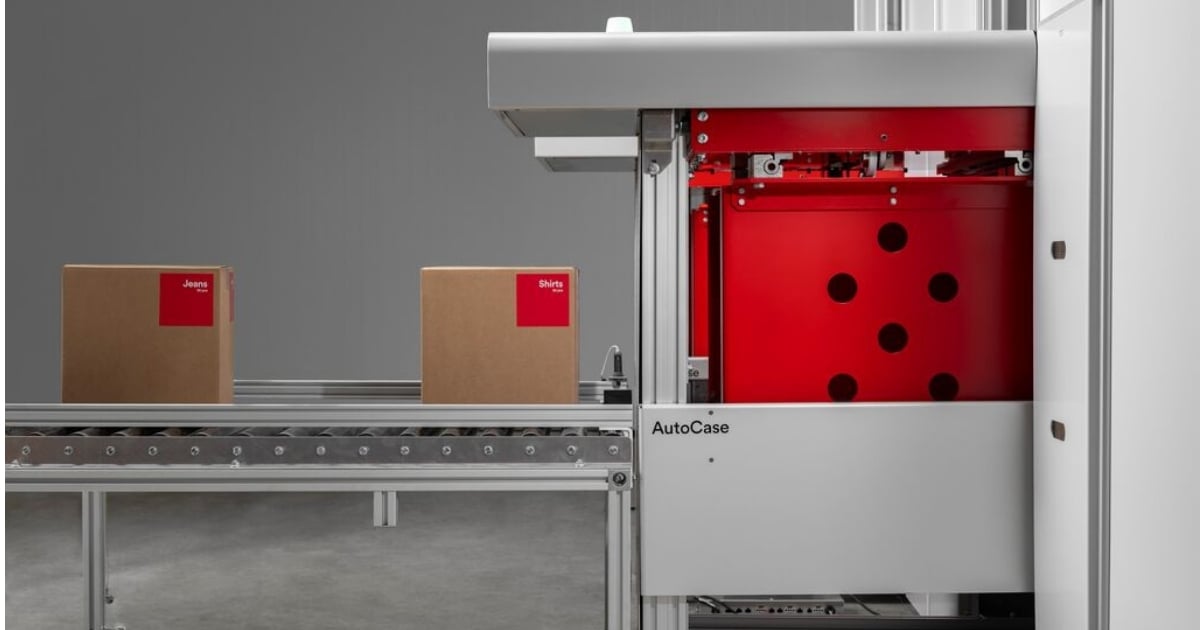
AutoStore is widely known as a goods-to-person system for storing and picking individual items. But many distribution centers don't fulfill just one type of order. The same operation may pick individual items for e-commerce orders while shipping full cases for store replenishment, wholesale or B2B customers.
Historically, supporting both split-case and full-case picking could require separate automation and material handling systems. That is no longer the case with AutoStore AutoCase, which expands those possibilities by adding an automated case handling solution alongside each-level storage and picking.
With AutoCase, cases can be inducted, stored, retrieved, buffered and sequenced within the same AutoStore system used for individual items. That creates new possibilities for operations looking to connect case and each workflows without treating them as completely separate processes.
What is AutoStore AutoCase?
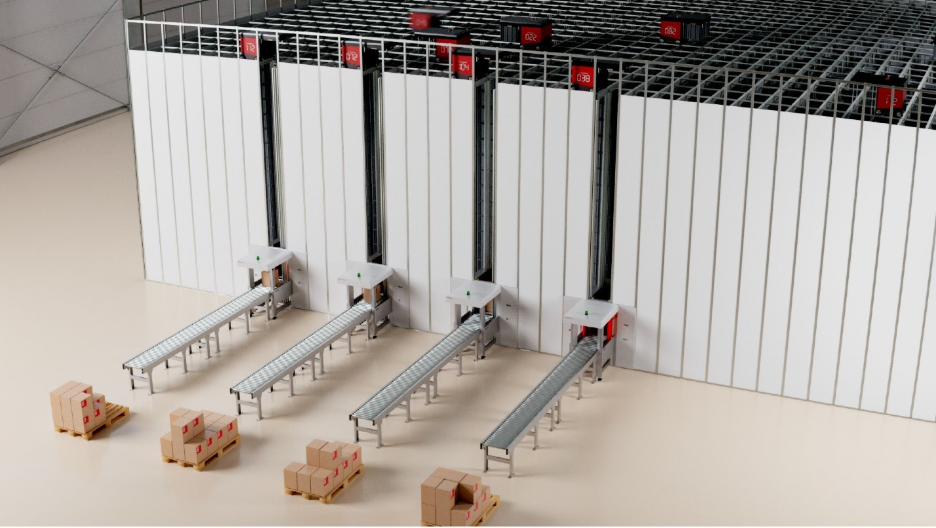
Cases are inducted into AutoStore via the AutoCase module and stored within AutoStore Bins. When needed, AutoStore Robots retrieve the Bins that contain the cases and deliver them to the operators’ workstations (Ports), where they can continue downstream for replenishment, shipping, consolidation or other processes. AutoCase can support inbound and outbound flows simultaneously.
The significance is not just the ability to store a case. It broadens the types of workflows that can use the AutoStore infrastructure.
An AutoStore system originally designed primarily around goods-to-person each picking can potentially take on additional roles, including full-case fulfillment, inbound case storage and order buffering. For existing AutoStore users, that creates another way to think about unused or changing Grid capacity as their operation evolves.
How Does AutoCase Work?
AutoCase automates the insertion and extraction of cases within the AutoStore Grid, eliminating the need to manually open and decant incoming cases into AutoStore Bins before storage. If you're new to the system, learn more about how AutoStore works.
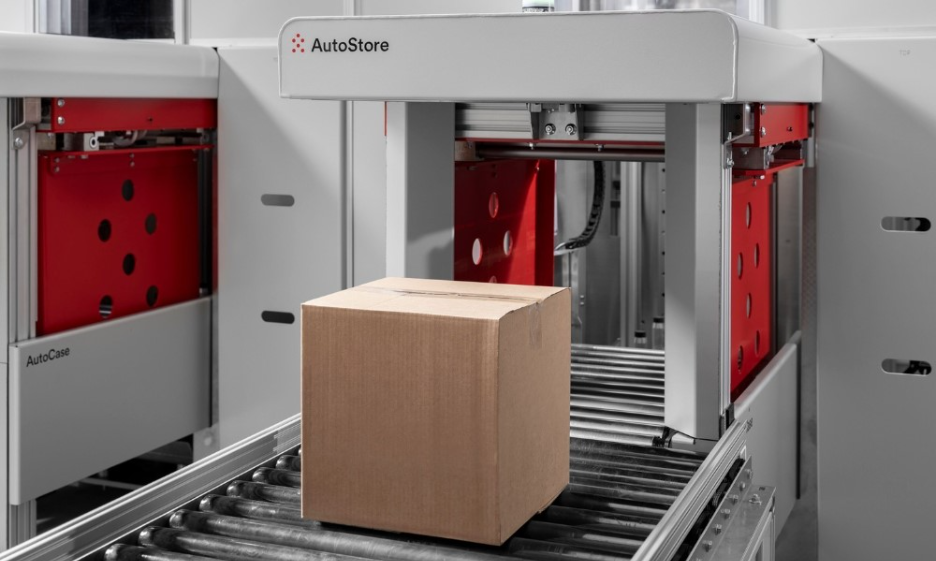
Cases travel by conveyor to AutoCase, where they are automatically secured and inserted into an AutoStore Bin for storage within the Grid. AutoCase adapts to different case sizes and uses a lift and pusher mechanism to automatically insert and retrieve cases without manual handling.
At a high level, the process looks like this:
- Induct: A case enters AutoCase and is automatically placed into an AutoStore Bin.
- Store: The Bin containing the case is stored within the Grid alongside Bins containing individual inventory.
- Retrieve: When the case is required, AutoStore Robots retrieve the appropriate Bin.
- Sequence: Cases can be retrieved in the required order and sent downstream for shipping, replenishment, palletizing or another process.
AutoStore refers to this as a case-in-Bin strategy, which also helps protect irregular or more sensitive cases during storage and retrieval.
But the more interesting question is what you can do with it.
AutoCase Workflows: Full Cases In, Full Cases or Eaches Out
One of the advantages of AutoCase is that the way inventory enters the Grid doesn't necessarily determine how it has to leave. Depending on the operation, a full case can be stored and later retrieved as a full case, or the inventory can support each-level picking.
Full case in → full case out: A complete case is automatically inducted, stored within the Grid and later retrieved as a complete case. This can support workflows such as store or B2B replenishment, buffering and downstream palletizing.
Full case in → eaches out: A complete case can be inducted and stored within an AutoStore Bin without first decanting its contents. When individual items are needed, the case can be presented at a picking station and eaches picked directly from the carton while it remains in the Bin. This can support manual or robotic piece picking.
Empty case in → consolidated order case out: An empty case can enter the system and be used as an order container for each-level picking. Once the order is complete, the consolidated case can be stored within the Grid until it is needed for downstream processing or shipping.
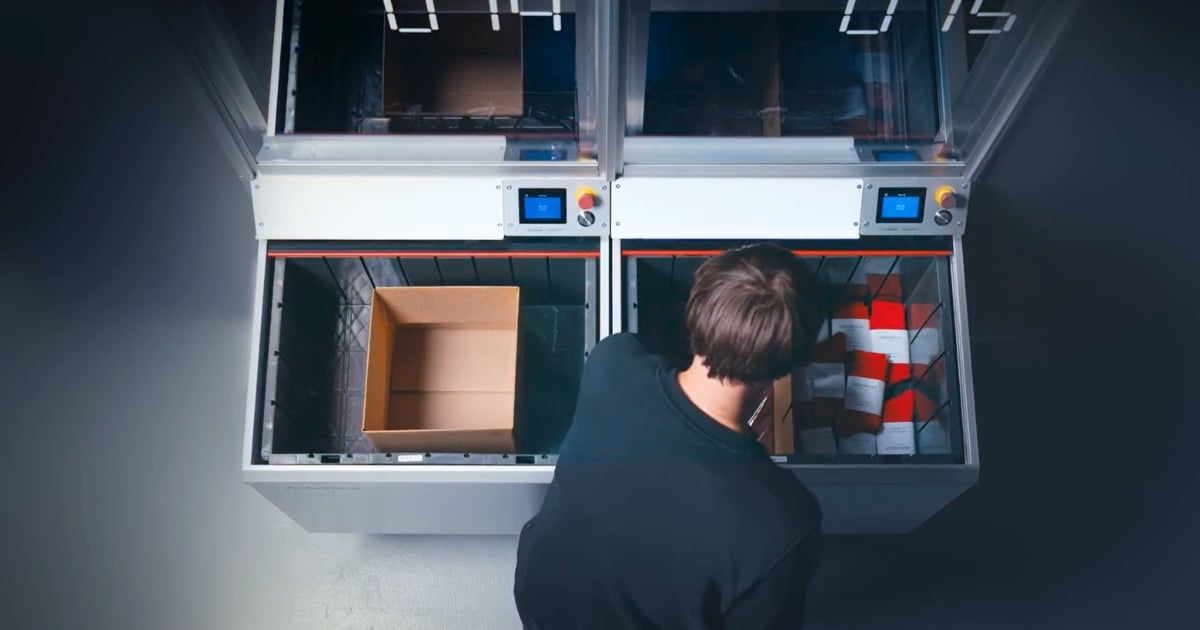
The image above is representative of the empty case in → consolidated order case out process. It depicts a warehouse operator at a VersaPort picking socks from an inventory bin on the right-hand side and then placing them into the case on the left-hand side to be shipped.
Use Cases
1. Automate inbound case storage
AutoCase enables complete cases to be automatically inducted into the AutoStore Grid without first opening the case and manually decanting the individual items into AutoStore Bins.
Cases are transported to AutoCase by conveyor, automatically inserted into the system and stored within the Grid until they're needed. This can reduce the manual handling required between receiving and automated storage while creating new options for how case inventory is used downstream.
2. Automate full-case replenishment and fulfillment
The full case in → full case out workflow allows a complete case to enter the AutoStore system, remain intact during storage and later be retrieved as a complete case when it's needed downstream.
This can support full-case applications such as store replenishment, B2B fulfillment or replenishment to other picking processes. Retrieved cases can also continue to downstream automation, such as conveyor or palletizing.
For operations already using AutoStore for each-level fulfillment, AutoCase creates another way to use the Grid for order profiles that require complete cases.
3. Use the AutoStore Grid for consolidation, buffering and sequencing orders
This may be one of AutoCase's more interesting applications.
Picking and shipping don't always happen at exactly the same time. Traditionally, completed orders or cases may need to sit on the warehouse floor, accumulate on conveyor or move into a separate staging or buffer area.
With AutoCase, the AutoStore Grid itself can become part of the consolidation, buffering and sequencing process. In an empty case in → consolidated order case out workflow, an empty case can be used for each-level picking and the completed order stored within the Grid until it's needed downstream.
Pairing AutoCase with robotic picking technologies such as VersaAI can extend this workflow further. Orders could be robotically picked overnight, stored within the Grid and automatically retrieved when outbound operations begin.
This also opens up more sequencing possibilities when the AutoStore system is managed by a WES such as your Kardex FulfillX. Completed orders can be released in the order required for downstream processes such as sortation, palletizing or truck loading.
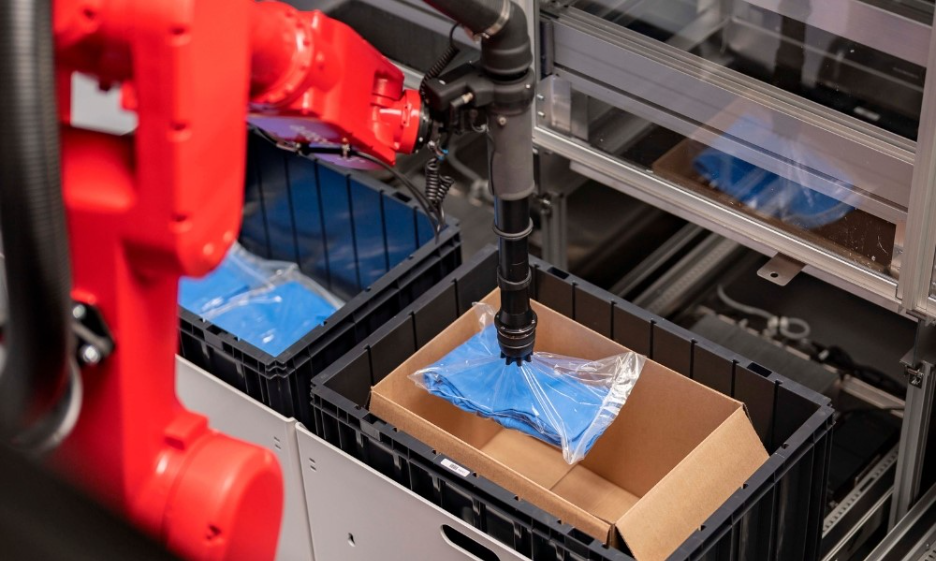
4. Support full-case and each picking in the same AutoStore system
Ultimately, AutoCase's broader value is the ability to support mixed workflows.
A distribution center might fulfill e-commerce orders requiring one or two individual items while also supplying retail stores with full cases. Another operation might receive inventory by the case, pick individual units from it, consolidate completed orders and later sequence those orders for outbound shipping.
AutoCase gives operations more flexibility in how inventory is stored and fulfilled within the same AutoStore system. Depending on the product and order profile, an inbound case can follow different paths.
A full case can remain intact within the Grid and later be retrieved as a complete case for full-case fulfillment. It can also remain intact while individual items are picked from the carton for each-level orders. Or, when it makes more sense for the application, the case can be decanted into an AutoStore Bin for traditional each-level picking.
This allows an operation to support full case in → full case out, full case in → eaches out, and full case decanted → eaches out workflows within the same AutoStore system.
Can AutoCase Be Added to an Existing AutoStore System?
Yes. AutoCase is designed for both new and existing AutoStore Grids. The module can be retrofitted into existing systems, allowing an operation that began with each-level workflows to expand into automated case handling.
That may be particularly interesting for existing AutoStore users whose operations have changed since the system was originally installed.
Perhaps store replenishment has grown. A new B2B channel requires more full-case orders. E-commerce volume has changed. Or the Grid has capacity that could support additional workflows.
What Types of Cases Can AutoCase Handle?
A case must be placed into an AutoStore Bin, so the cases must fit within the Bin and weigh less than 66 lbs.
This is also where FlexBins becomes relevant. FlexBins allows different AutoStore Bin heights within the same Grid, expanding the assortment of cases and each-level SKUs that can be accommodated while making better use of storage volume.
When Does It Make Sense to Use AutoCase?
AutoCase isn't simply a replacement for every full-case picking or case handling technology. The more useful question is whether bringing case handling into AutoStore solves a problem elsewhere in the operation.
It may be worth exploring when an operation:
- Needs to support both full-case and each-level fulfillment
- Receives inventory by the case but fulfills individual units
- Needs full-case replenishment for stores or B2B customers
- Uses significant floor or conveyor space for order staging and buffering
- Processes 1,000 to 5,000 cases per hour
- Needs cases released in a particular sequence for downstream processes
- Has an existing AutoStore system and wants to expand what the Grid can support
The opportunity becomes especially interesting when several of those needs overlap.
Expanding What AutoStore Can Do
AutoCase represents a shift in how AutoStore can fit into the broader fulfillment process. Instead of thinking about the Grid only as the place where inventory is stored before each picking, it can potentially support inbound case storage, each picking, full-case fulfillment, buffering, consolidation and outbound sequencing within the same system.
For new systems, that creates more options when designing workflows around multiple fulfillment channels. For existing AutoStore users, it creates an opportunity to reconsider whether the infrastructure already in place could support processes that weren't part of the original system design.
Want to see what AutoCase could look like within an AutoStore operation? Contact us to schedule a demo.
