
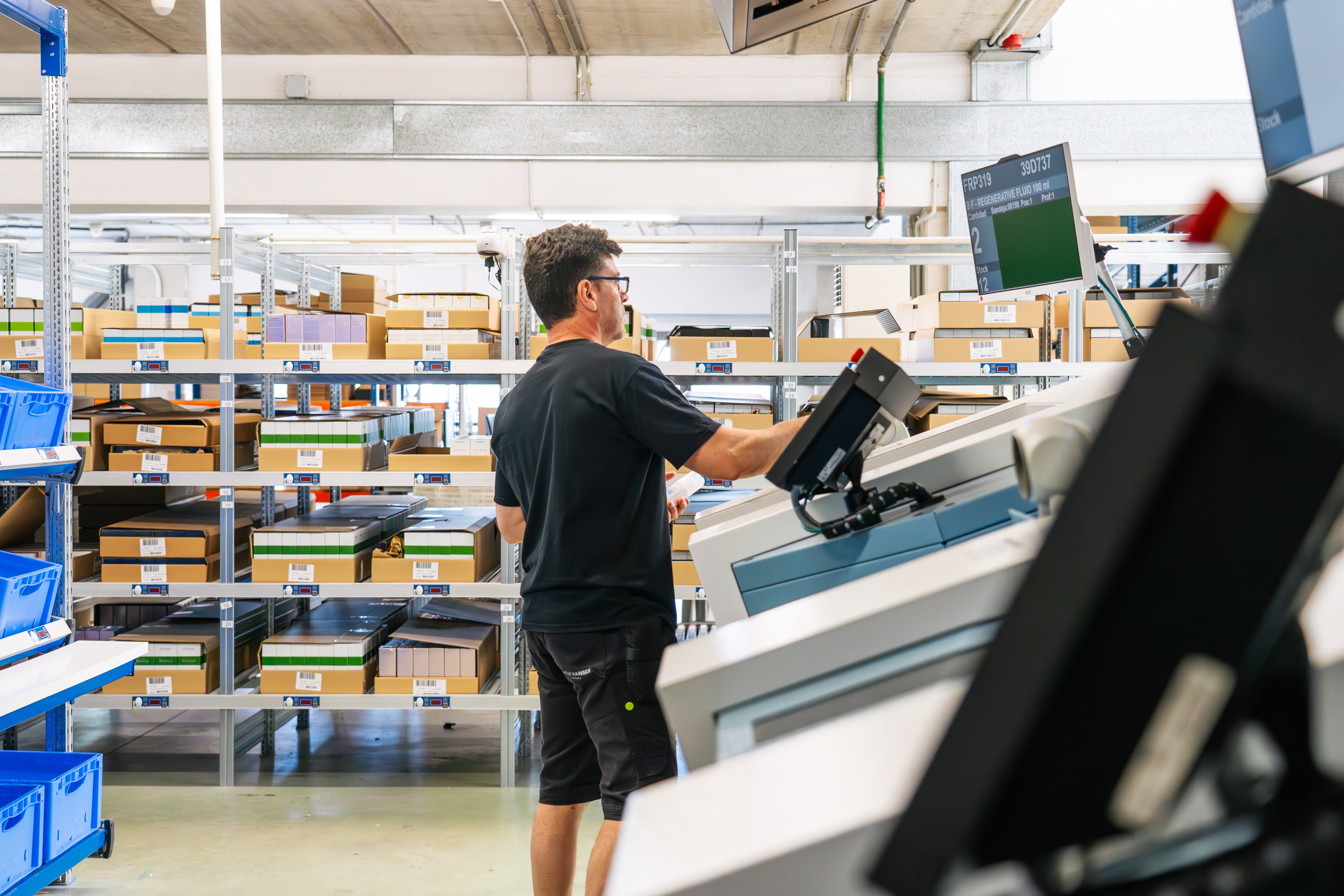
Most warehouses are still mostly manual, but the pressure to automate and integrate systems is only getting louder. The challenge is not knowing that you need automation, it is knowing where to start and how to build toward an integrated warehouse system without overreaching.
This guide gives you a practical roadmap for 2026: how to clean up your data, choose your first automation moves, and phase your way from manual processes to integrated operations. We will show you where technologies like Vertical Lift Modules (VLMs), Vertical Carousel Modules (VCMs), conveyors, scanning, and pack/ship tools fit in the journey, and how to connect storage, picking, packing, shipping, and returns into a system that actually works in the real world.
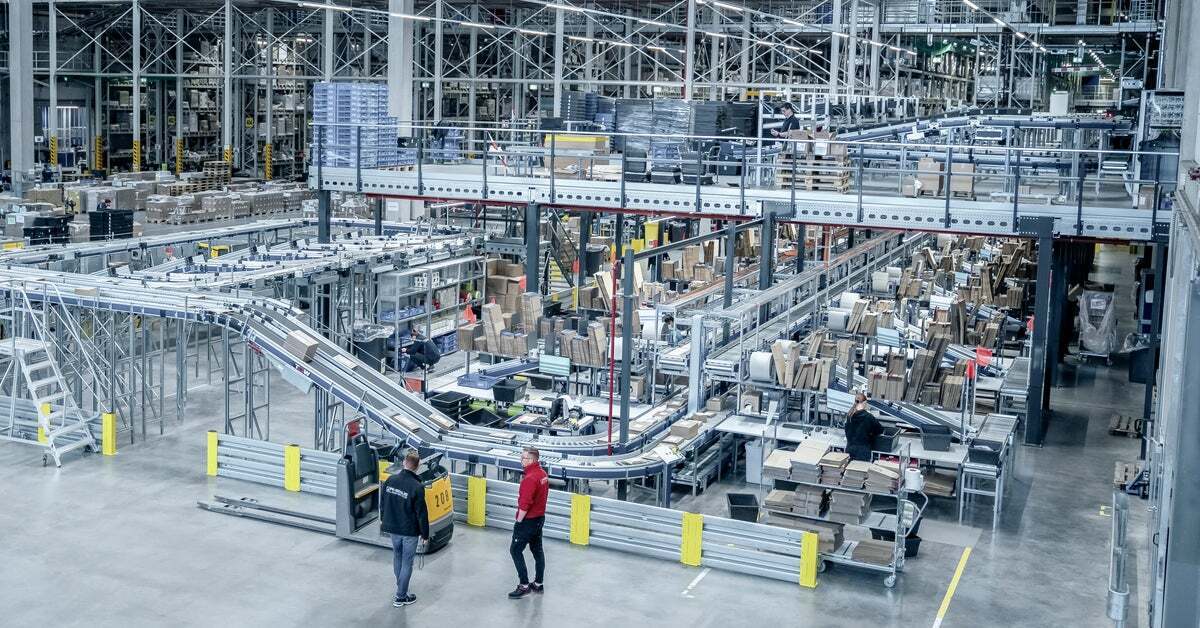
Before we talk about roadmaps and first steps, it helps to define a couple of terms that get used a lot and mean slightly different things to different people.
What is Warehouse Automation?
Warehouse automation is any use of technology to reduce manual work and make processes more consistent. That can be as simple as barcode scanning and label printing or as advanced as Autonomous Mobile Robots (AMRs) and fully automated storage and retrieval systems (ASRS). If it helps you pick, pack, move, or manage goods with less walking, typing, or guessing, it lives under the automation umbrella.
What Are Integrated Warehouse Systems?
Integrated warehouse systems go a step further than warehouse automation. Integration is what happens when your core systems talk to each other, so material and data move together instead of in separate silos. In a typical integrated environment, you might see:
- An ERP managing orders, customers, and finance
- A Warehouse Management System (WMS) or inventory platform managing locations, tasks, and stock levels
- Automation equipment like Vertical Lift Modules (VLMs), Vertical Carousel Modules (VCMs), conveyors, or robots receiving tasks and sending confirmations
- Shipping and packing systems pulling order data automatically and writing back tracking and status
You can have automation without integration.
For example, a standalone VLM running off a local controller.
You can also have “integrated” software without much automation hardware. The long-term goal for most teams is to combine the two: automation that is integrated into a wider warehouse system, not just islands of technology.
What Are the Types of Warehouse Automation?
Warehouse automation technology generally falls into four categories: storage and picking automation, movement and material flow automation, picking aid automation, and shipping, packing, and returns automation.
Understanding these four warehouse automation technology categories is the first step toward choosing the right one for your operation. Let's look at each in more detail.
1. Storage and Picking Warehouse Automation
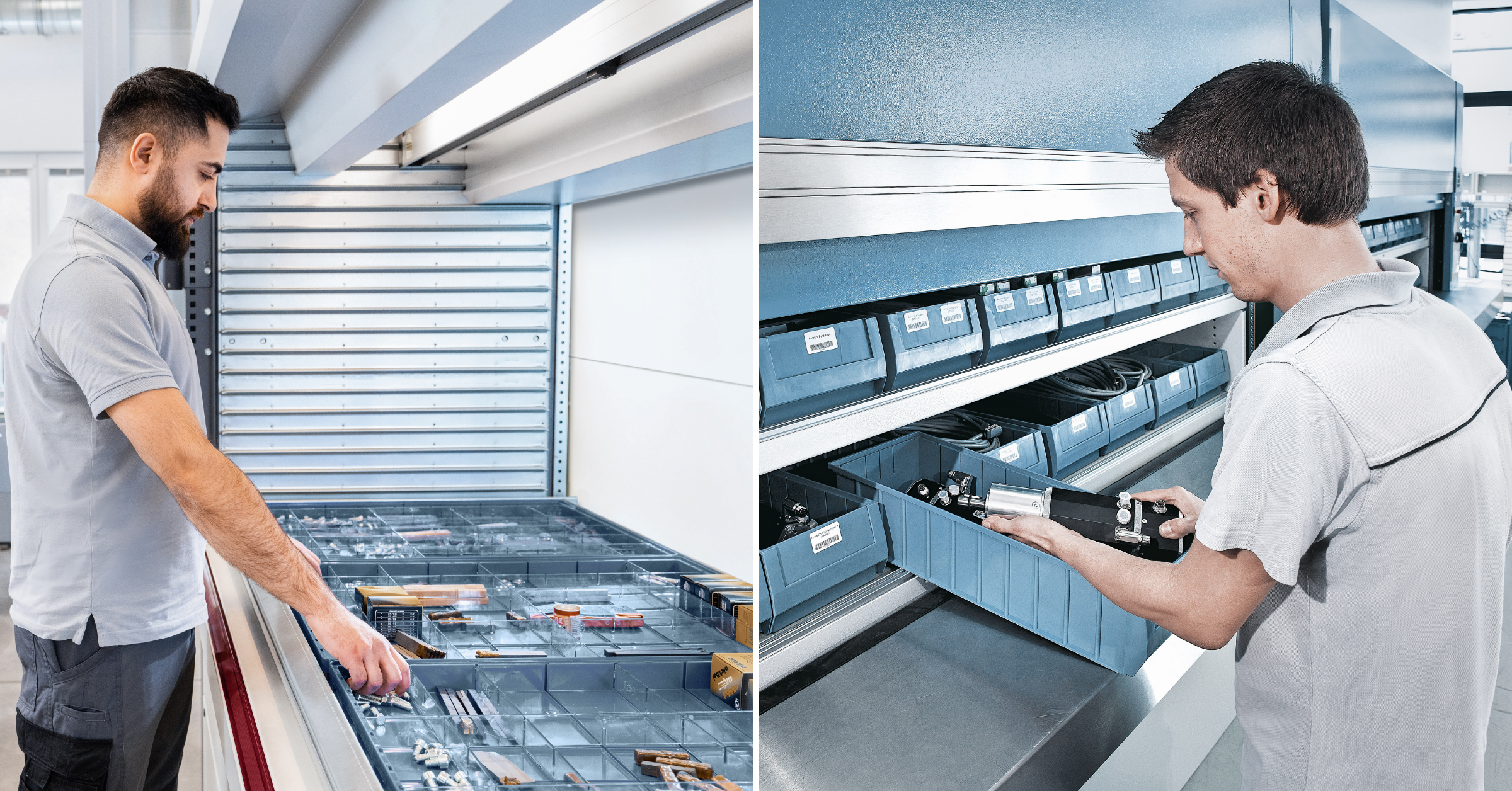
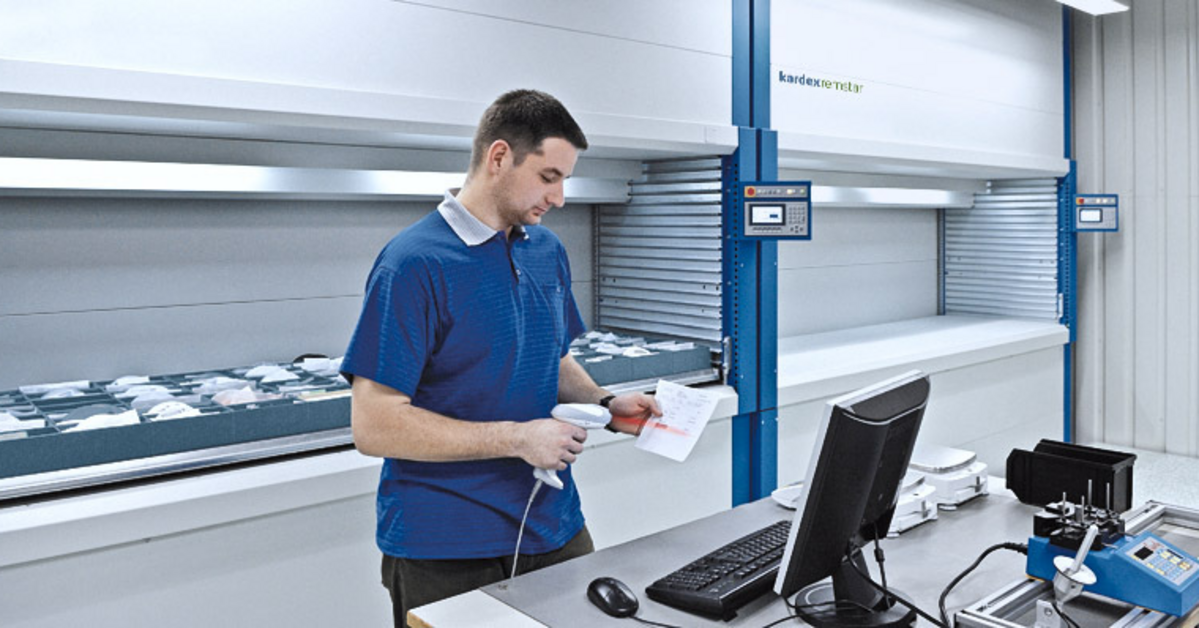
Vertical Lift Modules (VLMs) - Best for high-SKU, small or medium-sized items, tight footprints, and lean teams. Typical timing is as a first or second automation move. A Vertical Lift Module can start standalone and later be integrated with WMS, ERP, and other equipment.
Vertical Carousel Modules (VCMs)- Vertical Carousel Modules are best for lower ceiling heights, heavier items, and operations that want a simple, proven goods-to-person solution. Typically used alongside or as an alternative to VLMs in early projects.
Other ASRS (e.g., shuttle systems, mini-loads, AutoStore grids) - Best for higher volumes, dense storage, high throughput application or multi-zone networks where automation will play a central role. Usually a second-phase investment once the organization is comfortable with automation and has a clearer integration strategy.
2. Movement and Material Flow Warehouse Automation
Cart-based batch picking and pick carts with scanners - Best for manual operations that want quick productivity gains without major equipment installs. Often an easy early win in a largely manual environment.
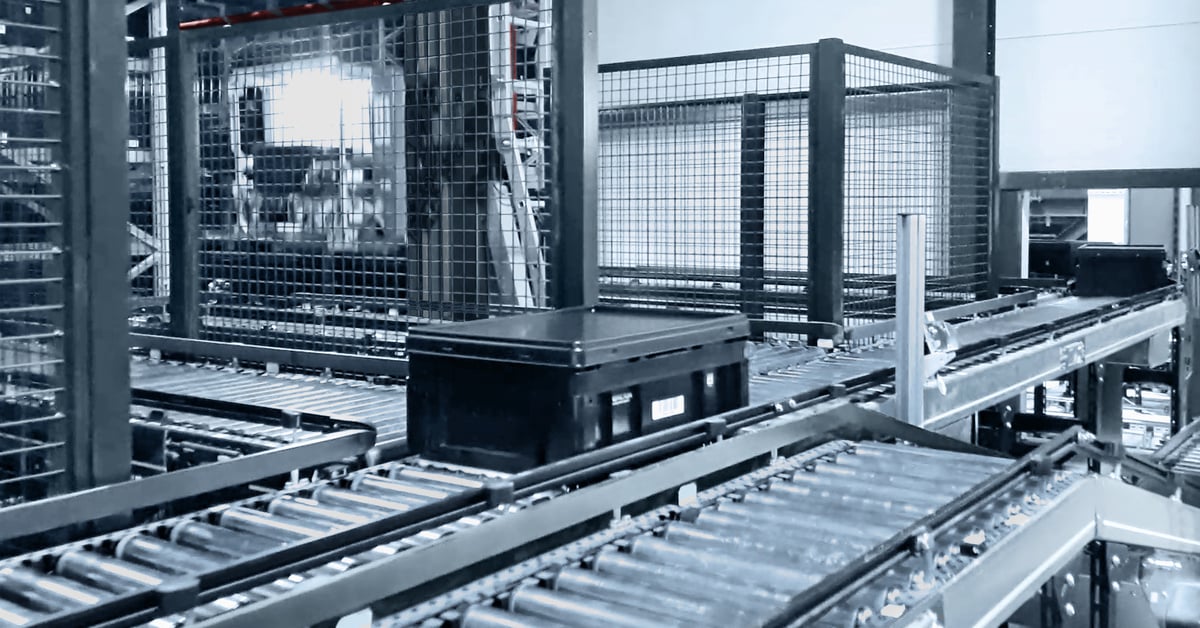
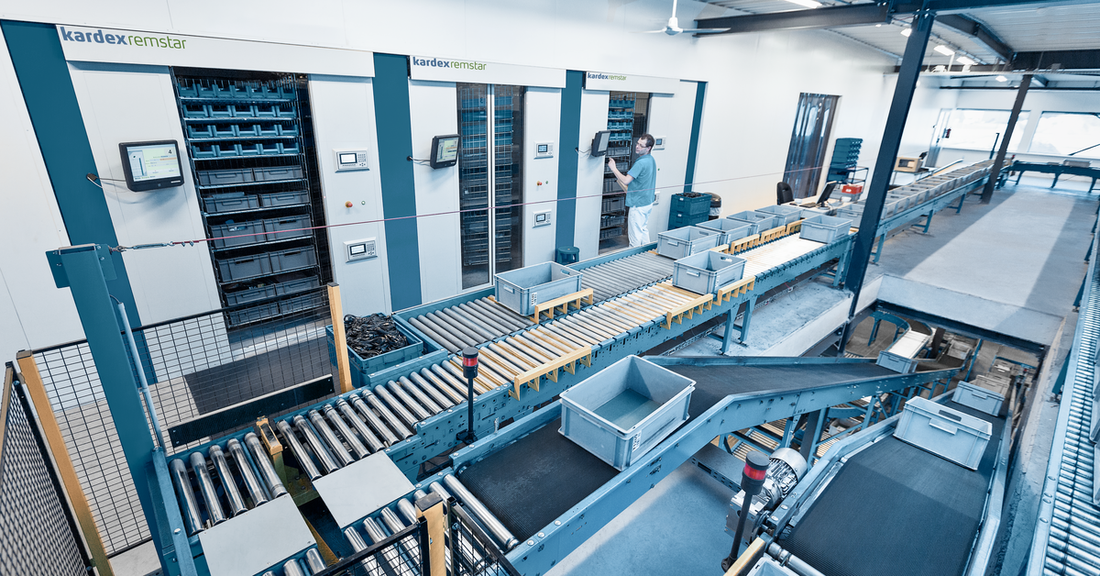
Simple conveyors - Best for moving totes or cartons between picking, packing, and shipping without constant cart pushing. Frequently a first or second move, especially when paired with VLMs or VCMs.
Autonomous Mobile Robots (AMRs) and Automated Guided Vehicles (AGVs) - Best for larger facilities or multi-zone environments where travel time between areas is a major bottleneck. Typically considered in later phases once basic processes and systems are in good shape.
3. Warehouse Picking Aids
Pick-to-light and put-to-light systems - Best for high order volumes, multi-line orders, or areas with a lot of manual picking. Commonly added once you have a stable storage layout and want to boost speed and accuracy.
Barcode scanning and mobile devices - Best for almost every operation. They improve accuracy and traceability with minimal disruption and are an ideal first step even before equipment automation.
Voice picking - Best for high-volume picking environments with repetitive, structured paths. Often introduced after basic scanning and location control are in place.
"A solution like Pick-to-Light's greatest value comes for early-stage distribution centers in its ability to deliver meaningful productivity gains without requiring a fully automated warehouse. When combined with other foundational technologies like AMRs and warehouse execution software, this can reduce travel time, improve inventory visibility, increase picking accuracy, and simplify employee training. It allows growing operations to handle higher order volumes, labor shortages, and SKU complexity while scaling automation in phases. Rather than replacing workers, this type of automation helps distribution centers eliminate non-value-added activities, improve throughput per employee, and create a foundation for future growth without significant facility expansion or operational disruption."
— Nate Aswege, Director of Sales & Marketing, Americas, Addverb
4. Packing, Shipping, and Returns Automation
Scan-to-pack stations and integrated scales - Best for reducing shipping errors and automatically capturing weights and contents. A straightforward early step that works in both manual and automated storage environments.
Shipping software integrated with ERP or WMS - Best for any facility tired of retyping addresses into carrier portals. Typically an early to mid-phase integration move that delivers fast payback.
Structured returns workstations - Best for operations with a meaningful volume of returns or repairs. Can be implemented very early and later enhanced with VLM or VCM storage for high-value returned items.
"As warehouses automate, the gains often show up first upstream, in faster storage and picking. Packing is what determines whether that speed actually reaches the dock, which is why it pays to optimize packing in parallel with a picking automation project rather than treating it as a later step. The decision a packer makes — which box to use — drives shipping cost, dimensional weight, and how much space each order wastes, and today most of it is guesswork. Bringing structure to that decision lets the throughput gains from automation carry all the way through packout instead of stalling there. Picking automation and packing optimization reinforce each other. Done together, each makes the other more effective, and the operation captures the full return on both."
— James Malley, Co-Founder & CEO, Paccurate
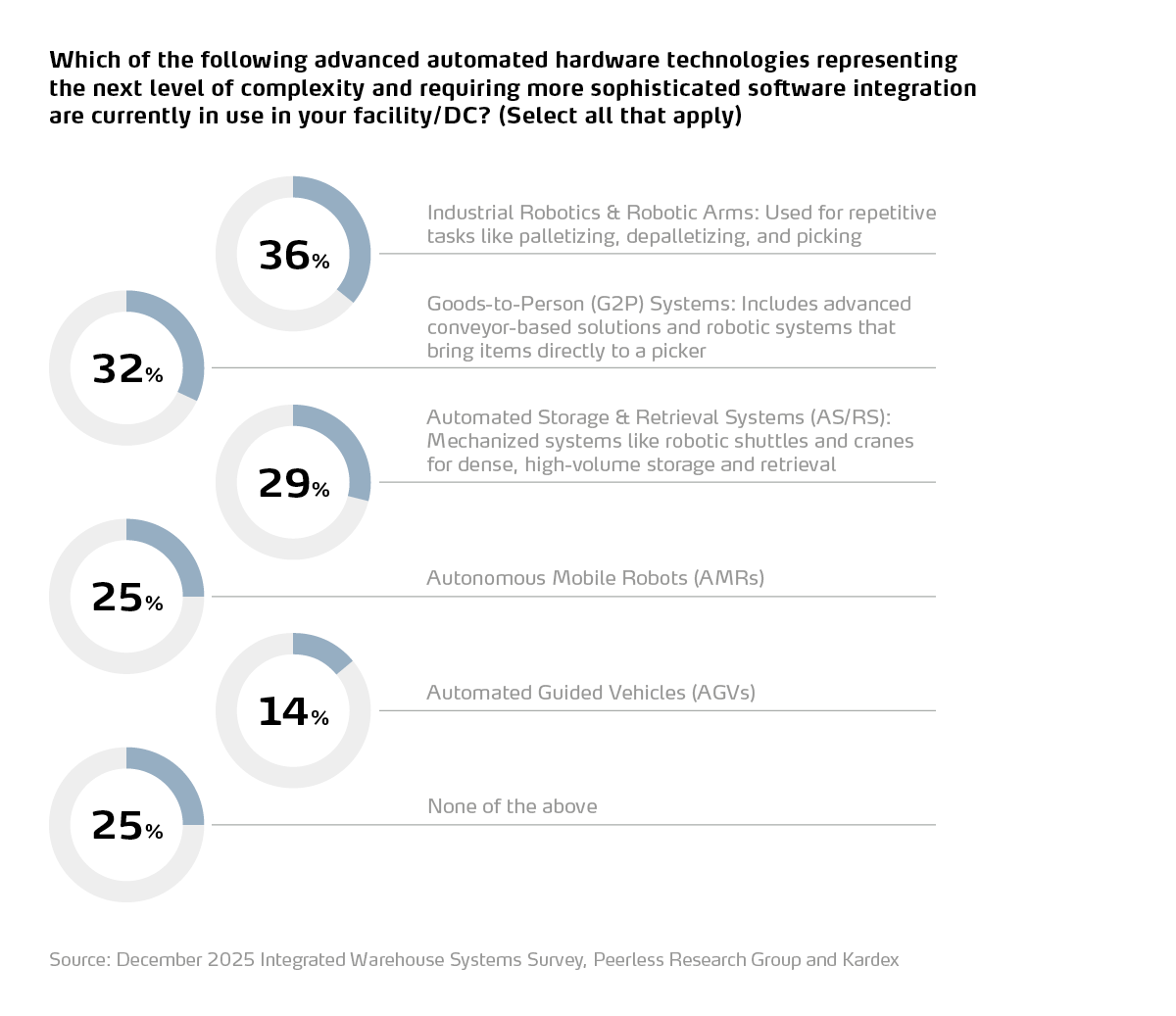
Wondering how you stack up? In our warehouse automation survey, we asked participants what advanced warehouse automation technology they're using. Here's how they responded:
What Does it Mean to be a Manual Warehouse?
Now, let's define “manual” in the way that most warehouses identify.
A typical manual or low-automation operation looks something like this:
- Static shelving, pallet rack, and floor stacking
- Orders printed from ERP, email, or an e-commerce platform
- Pickers pushing carts through long aisles, hunting by memory or labels
- Handheld scanners used for spot checks or basic confirmations, not driving the whole process
- Pack stations where operators type data into carrier portals or standalone shipping tools
- Returns handled in a corner or separate room, often with little structure
There might be software in the mix, but systems are rarely talking to each other. Data is retyped, exported, or copied between tools. A lot of the real “system” lives in people’s heads.
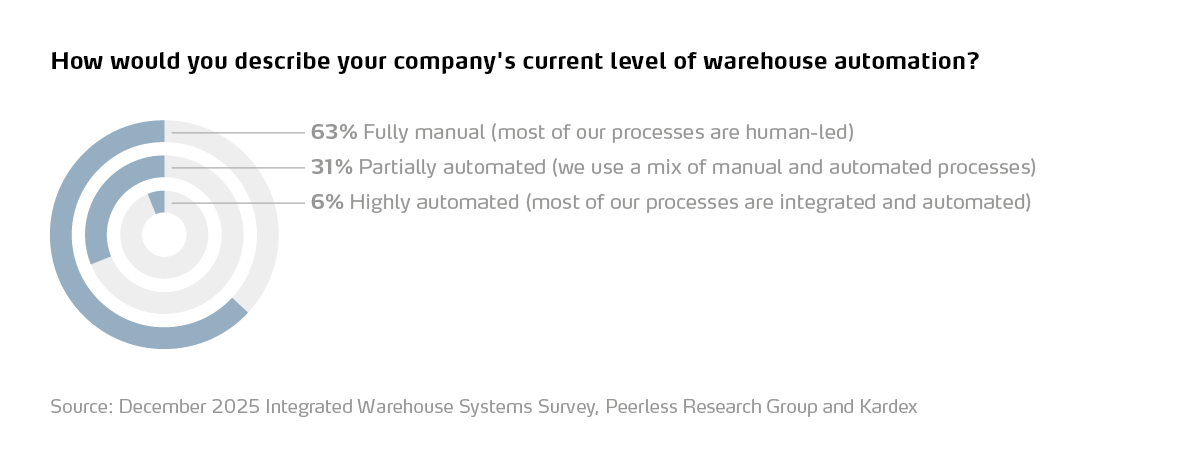
A recent survey of 127 warehouse leaders shows that 63% of respondents are still in this fully manual bucket. Many of them are working in small or mid-size buildings, often under 100,000 square feet, with lean teams and tight budgets.
Among manual operations, 38% say they feel “too small” for automation, yet roughly half still plan to integrate systems in the future.
So, if you have been thinking, “We are probably too small to automate, but we cannot keep working like this forever,” you are exactly who this roadmap is for.
Quick self-check
Before we talk about solutions, take a minute to ground yourself in where you are:
- Are we relying on spreadsheets or paper for inventory or returns?
- Do we retype order or shipment data into multiple systems?
- Where do people lose the most time: walking, searching, rework, or waiting?
- Which area feels the most out of control: storage, picking, packing, shipping, or returns?
Your answers will shape where you should start.
How To Prioritize Your First Warehouse Automation Project
If you are mostly manual today, the mission to “automate the warehouse” is simply too vague to be useful.
A better approach?
Automate a specific problem.
A simple way to choose your first project is to self-score the main parts of your operation on two things: pain and potential impact.
Warehouse Automation Project Self-Evaluation
Look at these five areas:
- Storage and space
- Picking and order fulfillment
- Packing and shipping
- Returns and quality
- Safety and ergonomics
For each area, ask:
- How painful is this today (1–5)?
- If we improved it, how much would it help our business (1–5)?
Evaluate the two scores. The highest numbers are usually the best candidates for your first automation project.
If storage scores highest: You are out of space, walking around overloaded shelves, and considering an expansion or off-site storage. A Vertical Lift Module (VLM) or Vertical Carousel Module (VCM) is a natural first move to consolidate storage and free floor space.
- If picking and labor score highest: You have lots of walking, missed picks, and overtime. Start with a VLM or VCM in your worst zone, paired with a clear picking strategy and basic picking aids like pick-to-light or scanning.
- If packing and shipping score highest: You see mispacked orders, rework at the dock, and people retyping data into multiple systems. Start with scan-to-pack workflows, integrated scales, and shipping software that ties into ERP or WMS.
- If returns score highest: You have a “returns pile” that never seems to disappear and lost inventory in the process. Start with a documented returns process and simple workstations; later, use VLM or VCM storage for high-value returns.
- If safety and ergonomics score highest: You have injuries from lifting, climbing, or repetitive motion. Goods-to-person automation like VLMs and VCMs, ergonomic hoists, and reorganized pick heights can be a very defensible first step.
The point is not to chase the trendiest technology. It is to choose a starting point where you can solve a real problem, prove value, and build internal support for the next phase.
No matter what your pain point is, there is a step-by-step roadmap you can adapt and customize for your specific warehouse.
Here is how you can get started with warehouse automation in 2026.
How to Get Started With Warehouse Automation in 2026
Step 1: Fix Your Data and Visibility
Before you buy any automation technology, you need to know what you have, where it lives, and how it moves.
Integrated warehouse systems can only do their job if the data underneath is halfway clean. Now, remember, that does not mean your data has to be perfect. It means that it should be consistent enough that you can trust your location, quantity, and order information.
No matter what your biggest pain point is, your warehouse will benefit from having an inventory audit.
Start with inventory basics
Focus on three simple foundations:
- Understand your inventory location structure: Create a clear, logical location scheme for shelves, bins, and pallet positions. Label locations so they can be scanned or keyed consistently.
- Spend a bit of time on a SKU and item master cleanup: If it’s been a while since your last SKU cleanup, consider spending a bit of time to standardize SKU IDs, descriptions, and units of measure. Avoid having the same item under three different names.
- Implement basic recording of key processes: Receiving: record SKUs and locations when items arrive and are put away. Picking: record locations or items for high-value or high-risk orders.
If you do not have a Warehouse Management System (WMS), this might be a good time to look at either a lighter-weight Inventory Management Software (IMS) solution or tightening up how you use the inventory module in your ERP.
Do not forget downstream data
Data and visibility are not just about what sits on your shelves. They also include what happens at:
- The packing bench: are we capturing what was actually shipped?
- The shipping dock: are weights, dimensions, and tracking numbers recorded reliably?
- The returns area: do we log why items came back and what happened to them?
Even simple changes like scanning at pack-out, capturing weights automatically, or logging return reasons give you a better foundation for any future automation or integration.
A simple 2026 “data checklist”
If this feels overwhelming, you’re not alone. Especially if you have a small team. Remember, you don’t need to do everything all at once. Instead, aim to check off at least a few of these in 2026:
- Every storage location has a unique ID and visible label
- SKUs have consistent IDs and descriptions in one system of record
- Receiving uses scanning for at least your top SKUs
- High-value or regulated items are tracked by lot, serial, or batch where needed
- Pack stations capture what was shipped and where, without retyping addresses
- Returns are logged with basic reason codes
Once these basics are in place, you are much better positioned to introduce automation without chaos.
Did you know? You can work with a Kardex specialist to completely analyze, categorize, and organize your inventory into your Vertical Lift Module? This lets your team focus on what really matters and can help you get up and running weeks – or even months – faster. Read More
Step 2: Choose Your First “Right-Sized” Automation Moves
With better data and visibility, you are ready to look at your first automation steps.
This does not mean you need a fully automated warehouse. It means you introduce one or two pieces of focused automation technology that help to tackle your biggest pain points and can grow alongside you.
For many operations, the most approachable starting points are:
- Vertical Lift Module (VLM) for high-SKU, small-part storage
- Vertical Carousel Module (VCM) when ceilings are lower or items are lighter
- Light-touch automation in packing, shipping, and returns
Why a Vertical Lift Module (VLM) is a natural first step
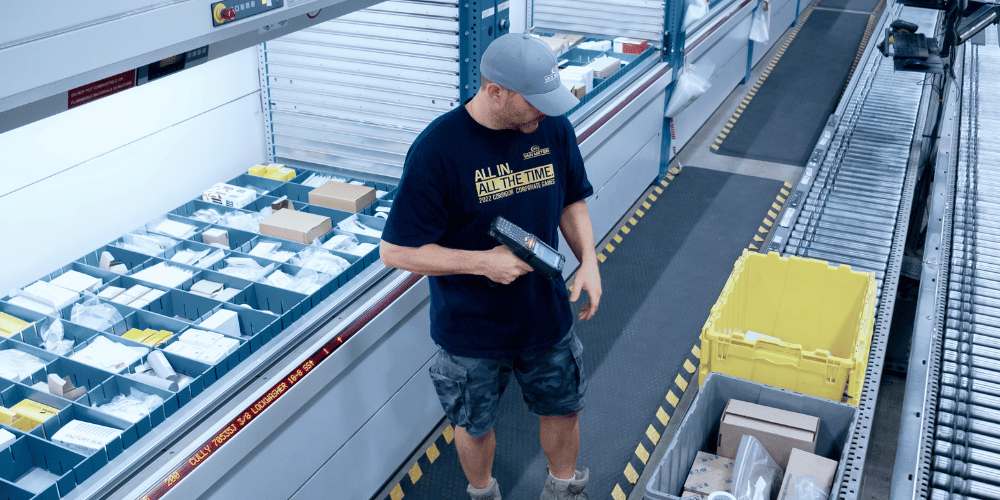
A Vertical Lift Module (VLM), like the Kardex Shuttle, is essentially an automated storage cabinet that allows you to utilize your vertical height. Trays of inventory are stored in two columns, and a central extractor brings the right tray to an ergonomic access opening when requested.
For small and mid-size operations, VLMs are often the first serious step into automation because they:
- Save a lot of space: A single VLM can recover up to about 85 percent of of your floor space compared to static shelving by storing vertically and eliminating aisles.
- Turn walking into working: Instead of walking aisles, climbing ladders, and reaching deep into shelves, operators stay at a workstation while the VLM brings items to them. This goods-to-person model boosts productivity and reduces fatigue and injuries.
- Improve accuracy: With options like pick-to-light, LED navigators, and Inventory Management Software such as the Kardex Power Pick System, the VLM can guide operators to the right SKU and quantity and validate picks.
- Work standalone or integrated: You can start with a standalone VLM controlled by simple software. Later, you can integrate it with your WMS, ERP, conveyors, or even robots.
If your biggest headaches are space constraints, long walking distances, and small parts going missing, a VLM is a strong candidate for your first automation project.
>> Learn more about the benefits of VLMs for small warehouses here.
Where a Vertical Carousel Module (VCM) fits
A Vertical Carousel Module (VCM), such as the Kardex Megamat, is another compact way to bring items to the operator. Instead of trays moving up and down on a central extractor, the carriers rotate in a loop, like a Ferris wheel.
VCMs are especially useful when:
- Ceiling heights are lower and full VLM height is not possible
- Items are relatively light and consistent in shape
- You want a simple, proven mechanical design
Like VLMs, VCMs can start as standalone units and then be integrated with WMS, ERP, or other automation later.
Easy wins in packing and shipping
If your primary bottleneck is at the packing bench or dock, your first automation steps may live there instead of in storage. Here are a few low-barrier moves to consider:
- Scan-to-pack workflows: Add scanners at pack stations so operators scan order IDs and SKUs as they pack. This confirms the order, reduces mispacks, and gives you cleaner shipment data.
- Integrated scales and basic dimensioners: Tie parcel scales to your shipping system so weights flow in automatically. If you ship a lot of parcel, a small dimensioner helps choose the right carton and calculate rates without manual entry.
- Semi-automated labeling: Move from typing addresses into carrier sites to scanning and auto-printing labels from a shipping or WMS tool. This is often a very quick win in accuracy and time savings.
- Short conveyor segments: A simple conveyor from a VLM or picking zone to pack stations can remove a lot of cart pushing and congestion. Start with a single run and basic controls; you can always integrate later.
These are all forms of automation, even if they do not look dramatic. They reduce touches, cut typing, and structure the workflow.
Bringing order to returns and quality checks
Returns are where many manual operations quietly bleed time and sanity. You do not need robots to start automating returns. You need structure.
Consider:
- Dedicated, standardized returns stations: Create a consistent flow for inspecting, logging, and reassigning returned items. Equip stations with scanners, a screen, and a label printer.
- Using VLMs or VCMs for high-value returns: If you resell a lot of returned stock, especially high-value items, consider giving them a home in a VLM or VCM. When integrated with your system, returns can be scanned and put away directly into automated storage, with inventory updated in real time.
- Photo and documentation workflows: A simple setup where operators capture photos of damaged goods and log reason codes reduces guesswork and improves your data.
Again, the goal is not “flashy automation.” It is turning a chaotic process into a repeatable one, with the help of tools.

Step 3: Build Toward Integrated Warehouse Systems in Phases
Once you have some basic automation in place, integration becomes the next logical step.
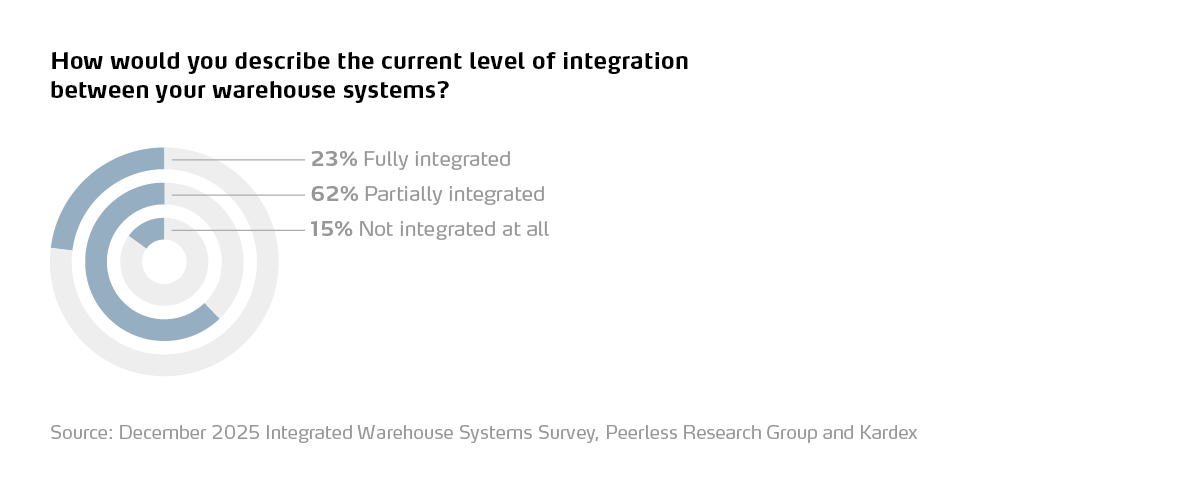
Our survey shows that only 23% of respondents have fully integrated warehouse systems, while 62% say their systems are partially integrated and 15% are not integrated at all.
The good news is that you do not have to make a giant leap from “nothing integrated” to “everything integrated.” You can build in phases.
Phase 1: Connect your core systems
Start by making sure your primary business systems can talk to each other:
- Connect ERP and WMS or inventory software so orders, receipts, and inventory levels flow between them automatically.
- If you do not have a WMS, look at connecting ERP to a lighter-weight inventory system that handles locations and basic workflows.
- Consider connecting shipping software so order and address data flow in, and tracking numbers flow back, without retyping.
This alone reduces a lot of manual data entry.
Phase 2: Connect your first automation
Once core systems are talking, start connecting your first pieces of automation:
- WMS > VLM / VCM
- Let the WMS send picks to the VLM or VCM.
- Let the VLM send confirmations and real-time inventory updates back.
- WMS > conveyors
- Use basic signals so totes or cartons move to the right zone without manual pushing or routing.
- WMS > returns / quality processes
- If you use a separate returns or RMA tool, connect it so returned items re-enter inventory accurately and quickly.
At this stage, you are turning your first VLM, VCM, or conveyor into a true node in an integrated warehouse system instead of a smart island.
"Sortation Systems at their core take material flow to the next level. They're a great intermediate step on any company's automation journey because they can either be a natural extension of material flow systems that are already in place or serve as the backbone behind a brand-new system in a warehouse. They are a key element that allows companies to take standalone automation technologies and connect them to each other in an intelligent and efficient way. Together with WMS, WES, and IMS solutions, Sortation Systems serve as critical arteries for advanced automated warehouses."
— Nick Geisser, Key Account Executive, EuroSort
Phase 3: Connect shipping and analytics
Finally, look downstream and up a level:
- WMS > carrier and TMS tools
- Use integrations for label generation, rate shopping, and tracking updates.
- Analytics and dashboards
- Pull data from ERP, WMS, VLM/VCM, shipping, and returns into shared dashboards.
- Track KPIs such as lines picked per hour, space utilization, order accuracy, and returns rate.
This is where you start getting the “control tower” view that many people imagine when they think about integrated warehouse systems.
Step 4: Turn This Roadmap Into a 2026 Action Plan
A roadmap is nice. A short list of actions is better.
Here is how you can turn all of this into a realistic plan for 2026.
1. Pick one area to focus on first
Ask:
- Is our main pain space, speed, accuracy, labor, or returns?
- Where would a visible win get the most support internally?
For example:
If you are out of space and walking miles, start with a VLM or VCM project.
- If packing is chaotic, start with scan-to-pack and better shipping tools.
- If returns are a mess, standardize your returns stations and processes first.
2. Choose one low-complexity automation move
From that focus area, pick one tangible project that fits your size:
- One Vertical Lift Module to replace dense small-parts shelving
- One Vertical Carousel Module for a lower-ceiling area
- A short conveyor from picking to packing
- Scales and scanners integrated into your shipping software
The right first step is something you can install, learn, and scale, not something that takes two years to design.
3. Plan for integration, even if you don't do it yet
As you choose equipment or software, ask vendors:
- Can this run standalone today?
- What systems can it integrate with later?
- Do you have proven connectors to common ERPs, WMS platforms, or shipping systems?
Designing for “standalone now, integrated later” keeps your options open. Technologies like VLMs and VCMs are particularly good at this, because they already play nicely with both manual workflows and integrated environments.
4. Give IT a seat at the table early
Even for a single VLM or simple packing upgrade, loop in IT early. Share:
- Your goals and timeline
- What systems might need to talk to each other
- What data you want to capture or automate
This helps you avoid surprise roadblocks and makes integration smoother when you are ready.
5. Use survey benchmarks to stay grounded
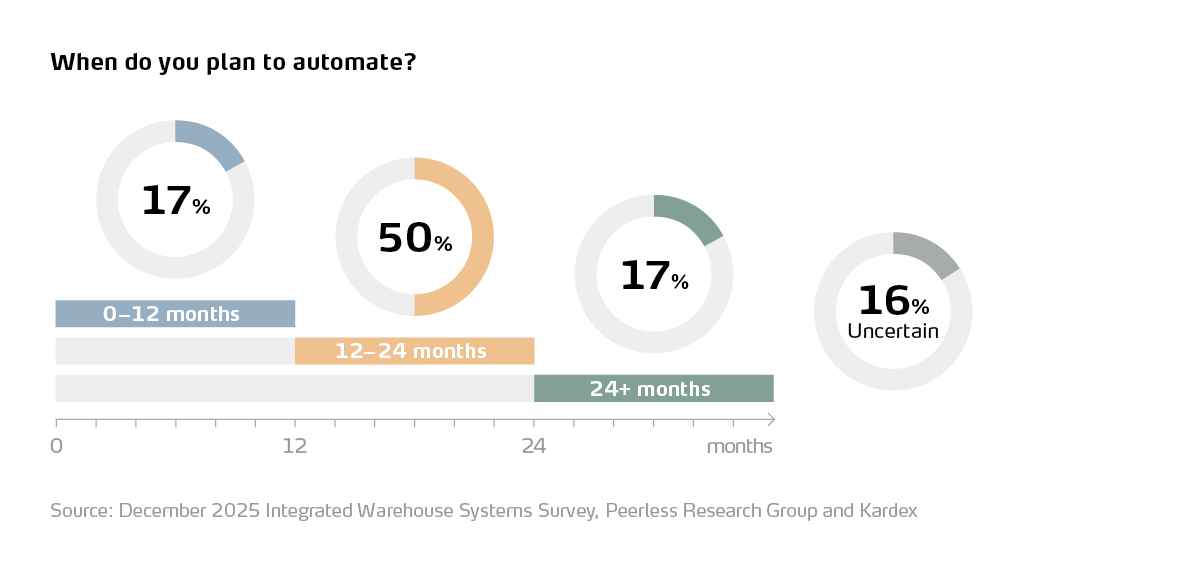
The Integrated Warehouse Systems Survey can help you avoid unrealistic expectations. Remember:
- 63% fully manual, 31% partially automated, 6% highly automated
- 23% fully integrated, 62% partially, 15% not integrated
- 75% say integration is essential, but most are still in the journey, not at the destination
Your goal for 2026 might simply be:
- Move from fully manual to “some automation” and “some integration”
- Execute one successful VLM or VCM project
- Connect one or two critical systems
That is meaningful progress.
Don’t Forget the People Side of Warehouse Automation
Automation changes work. It does not make people irrelevant; it changes what you need them to be good at.
If you are moving from manual processes into a world with VLMs, VCMs, scanning, and integrated systems, plan for:
Training before and after go-live
- Build short, focused training sessions for operators, leads, and supervisors.
- Use simple checklists and visuals, not just manuals.
- Plan for a second round of training a few weeks after go-live, once real questions and edge cases start to surface.
Clear, written processes
- Document how receiving, putaway, picking, packing, and returns work in the new setup.
- Make sure there is no confusion about when to use the VLM or VCM, when to use shelving, and how to handle exceptions.
- Keep SOPs accessible near the work area, not hidden in a shared drive.
Ongoing coaching and feedback
- Use system data (like transaction logs and pick rates from Kardex Power Pick System) to spot where people might be struggling.
- Treat that data as a coaching tool, not a hammer. Ask “What is getting in your way?” as much as “Why is this slow?”
Ergonomics and safety as selling points
- Emphasize that goods-to-person automation is about making work safer and more sustainable, not just faster.
- Highlight changes like less ladder climbing, fewer long walks, and more work in the “golden zone” between waist and shoulders.
If you get the people side right, each step in your automation roadmap gets easier. If you ignore it, even the best-designed system will underperform.
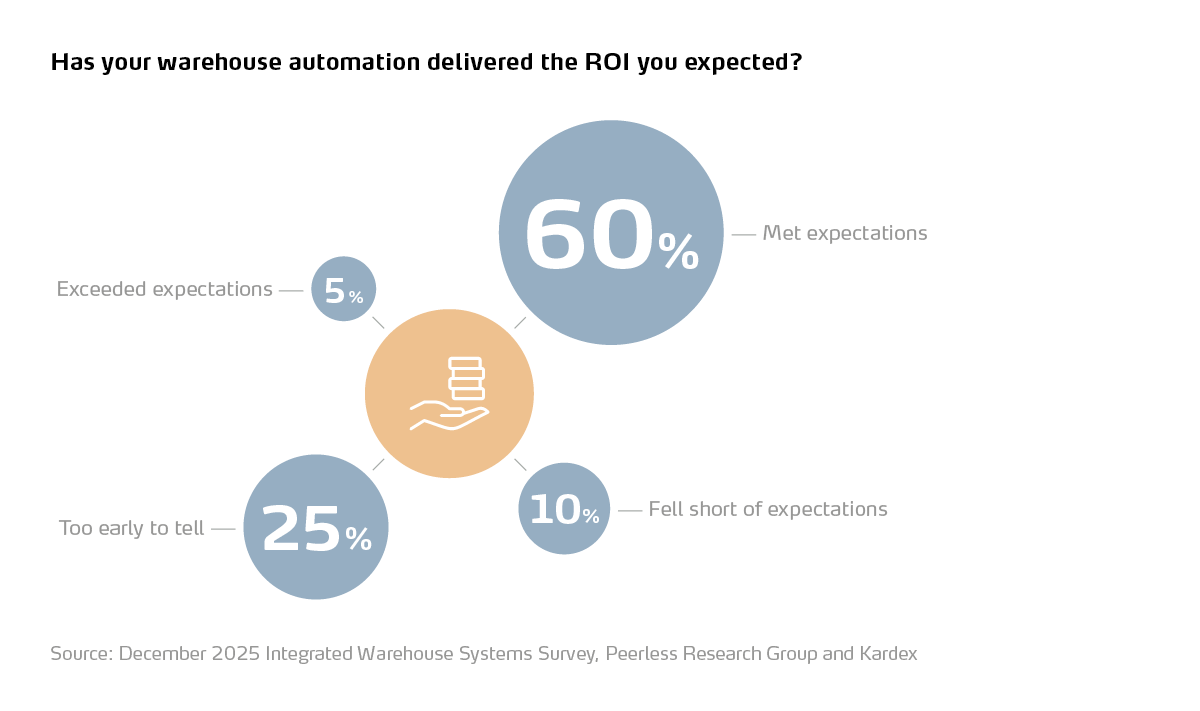
Not to mention, warehouse automation delivers ROI:
Common Roadblocks to Warehouse Automation
A few things that tend to derail warehouse automation and integration projects.
Waiting for the perfect future state
Teams spend months or years designing the ideal end-to-end system and never actually start. It is far better to sketch a long-term vision, then execute a small, contained first project that proves value and teaches you what to do next.
Treating VLMs or VCMs as just “machines”
If you buy the hardware but do not rethink your processes or data, you end up with expensive islands of automation. Each step into automation should be treated as a process redesign opportunity, not just a purchase order.
Ignoring IT until the end
Equipment arrives, and only then does everyone realize it does not talk to your existing systems. Bringing IT into vendor conversations and design sessions from day one prevents ugly surprises and makes integration much smoother.
Skipping training and change management
When people are not properly trained, they keep doing things the old way in parallel with the new system. Investing in training, clear SOPs, and follow-up in the first three to six months ensures the new tools are actually used the way they were designed. If you plan for these roadblocks up front, your chances of getting real, lasting value go way up.
If you plan for these up front, your chances of getting real, lasting value go way up.
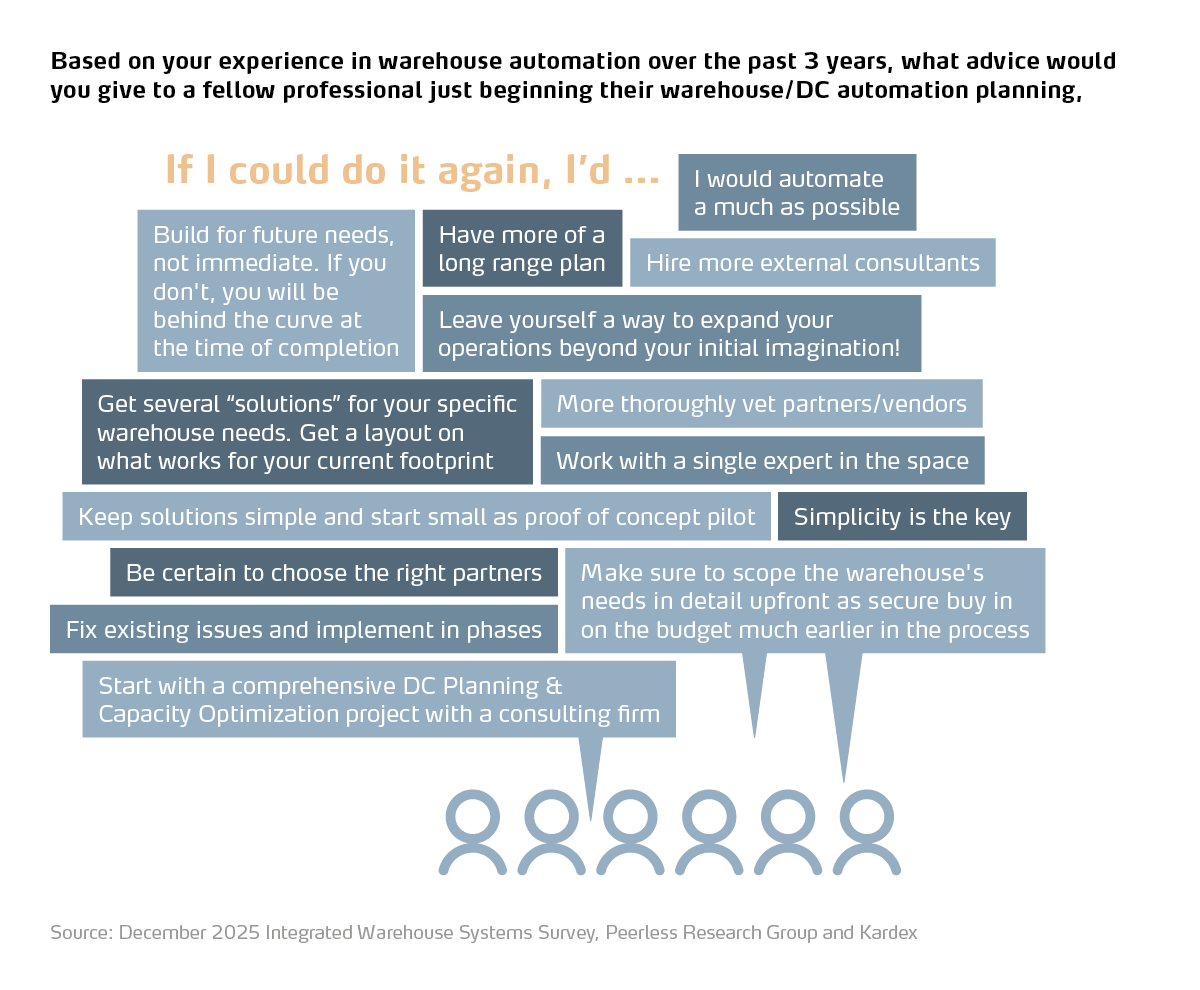
Advice From Real Warehouse Managers
We asked warehouse managers to share advice on their automation and integration projects. Here’s what they said:
Expert Perspectives on Warehouse Automation
We spoke with technology partners across the warehouse automation space to gather perspective on what actually works — and what warehouses often get wrong — as they move from manual operations toward more automated ones.
Here's one perspective on sortation and system integration that's particularly relevant for warehouses further along their journey:
"Automated sortation and conveyance solutions address the throughput, accuracy, and labor efficiency issues forming the backbone of scalable operations as businesses evolve. Sortation automation solutions connect processes across cross-docking, outbound distribution, and omnichannel fulfillment, where speed and variability are constant pressures. Technologies like high-speed loop and cross-belt sorters enable predictable, high-volume flow, while pouch-based systems add another layer — functioning as dynamic storage and sequencing engines to buffer variability, consolidate orders, and support flexible release into packing or shipping. The result is an operation designed around its flow strategy — whether high-throughput distribution or highly flexible fulfillment — while maintaining the ability to adapt as volume, mix, and complexity change over time."
— Rupesh Narkar, Vice President, Sales & Systems, Logistic Systems, Beumer Group
You can also see how 127 warehouse leaders described their own automation journeys in our 2026 Integrated Warehouse Systems Survey.
Best Practices That Make Any Warehouse Automation Work Better
Even the best Vertical Lift Module, Vertical Carousel Module, or conveyor line cannot fix a broken process on its own. The teams that get the most out of automation layer it on top of solid, low-tech best practices.
Here are a few to focus on as you move along your roadmap:
1. Slotting and SKU layout that match reality
Review SKU velocity regularly and adjust locations so true fast movers are the easiest to pick. Keep SKUs frequently picked together near each other, or consider kitting them. Group bulky fast movers in more traditional pick zones and reserve automated storage for high-mix, small or medium movers that benefit most from dense, goods-to-person storage.
2. Use bins, totes, and dividers to control the chaos
Loose product on open shelves is hard to manage and even harder to move into automation later. Standardizing on bins, totes, and dividers keeps parts clean and organized and makes it much easier to use the full cube inside a VLM or VCM when you are ready. Think of this as “prepping” your inventory for automation.
3. Design the flow, not just the storage
Walk your facility from receiving to stocking to picking to packing and shipping. Look for zig-zags, cross-traffic, and dead ends. Simple changes like one-direction flow, defined consolidation zones, and clearer paths will pay off immediately and make it much easier to drop in a VLM, carousel, or short conveyor run without redoing everything later.
4. Choose a picking strategy and stick to it
Whether you lean toward batch picking, pick-and-pass, or parallel picking, the key is consistency. The more structured your picking strategy is today, the easier it will be to layer in goods-to-person technology, pick-to-light, and scan-to-pack workflows without confusion.
5. Give returns a real process, not just a corner
Returns are one of the most overlooked areas in many warehouses. Define how returns are received, inspected, logged, and put away. Even if it is entirely manual today, a clear returns flow makes it much easier to later decide what should go back into automated storage, what should be scrapped, and what data needs to feed back into your systems.
6. Plan for flexibility and growth
As you make layout and process changes, keep future moves in mind. Avoid locking yourself into a maze of static shelving if you know you may add VLMs, carousels, or conveyors in the next few years. Leave reasonable space where automation is likely to land and keep aisles and workstations flexible enough to shift as volumes change.
FAQ: Getting Started With Warehouse Automation And VLMs
Our warehouse is under 50,000 square feet. Are we too small for automation?
No. Many automated operations run in buildings under 50,000 or 100,000 square feet with lean teams. The key is to pick a focused problem to solve, such as a cramped small-parts area or a busy pick zone, and start with a right-sized solution like a Vertical Lift Module or Vertical Carousel Module.
Do I need a WMS before I install a VLM or VCM?
Not necessarily. Many facilities start with a VLM or VCM running on its own controller with inventory management software, then integrate to WMS or ERP later. The important part is to have clean item and location data so you can load the system properly.
How long does it usually take to go from “manual” to running a VLM?
Timelines vary, but a typical first VLM project, including design, installation, and go-live, is often measured in weeks or a few months, not years. Most of the time is spent on planning, data preparation, and slotting rather than the physical install.
What if our biggest problems are in packing and shipping, not storage?
You may want to start your automation journey in packing and shipping instead of storage. Scan-to-pack workflows, integrated scales, shipping software, and simple conveyors are all valid “first steps” that can later be connected to VLMs, VCMs, or other storage automation.
How do we avoid buying the wrong thing or over-automating?
Start with a clear understanding of your pain points and goals. Use a phased approach: clean data and processes, one or two focused automation projects, then integration. Work with partners who can model different scenarios and show you what happens at different levels of investment before you commit.
Does automation mean we will need fewer people?
Automation often changes where people spend their time. Instead of walking, searching, and lifting, they spend more time on exception handling, quality, and higher-value tasks. Some operations do reduce headcount over time through attrition. Others use automation to grow without hiring at the same rate.
How do we know if we are “ready” to integrate systems?
If you have reasonably clean data, a stable process, and at least one piece of automation or core software that is working well on its own, you are ready to start planning integration. Integration does not have to be all or nothing. You can start by connecting just two systems, such as ERP and WMS, or WMS and your first VLM.
Keep Learning
If you want more data to support your roadmap, you can:
- Download the Integrated Warehouse Systems Survey report to see how 127 operations are approaching automation and integration.
- Read our Integrated Warehouse Systems Statistics for 2026 article for a deeper dive into the numbers.
- Explore our content on VerticalLift Modules (VLMs) and VerticalCarousel Modules (VCMs) to see where they might fit in your own first step.
Most of your peers are somewhere in the messy middle. The advantage will not go to the ones with the loudest buzzwords. It will go to the teams that quietly pick a realistic first step in 2026 and take it.
